About Me ☆

Hello, I am Sami, the Girl behind Guilty Pleasures. I have been
writing tutorials since May 22, 2009. My first tutorial was called Twilight Obsession. How I got my name is simple. I found tagging to be my Guilty Pleasure. I thought it fit perfectly. I am a designer as well. You can find links to my blogs on my top menu. If you have questions please feel free to ask. Other wise you can read more about me on my
ABOUT ME PAGE!
My Blogs☆

Store Manager ☆

CT Manager☆









Favorite Blogs ☆







My Hangouts☆


Monday, March 22, 2010
Touch of Night
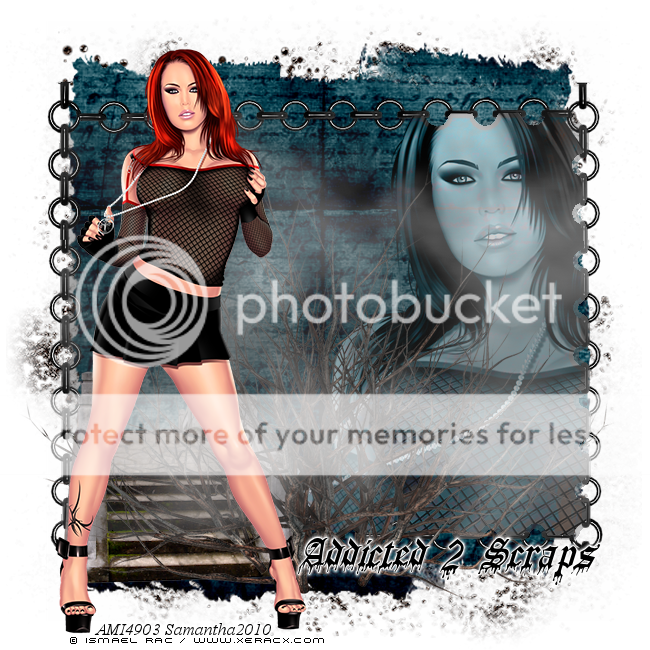
This tutorial is featuring a brand new
scrap kit by Addicted 2 Scraps. It is PTU Kit
Tube by Ismael Rac. Do not use his work unless
you have a license to do so.
Create new raster layer 650x650
You can flood fill white but I
am leaving it with a transparent background
Open Element12
copy and paste as new layer
open your tube close up layer
Copy and paste as new layer
Grab your magic wand
Highlight the Element 12 layer
And select inside of it
Go to Selection, modify and expland by 5
highlight your close up layer
Go to selections invert and hit delete
Add a Lumance Legacy to that
Open Element1 copy and paste as new layer
Move behind all other layer
Now open element49
copy and paste as new layer
Resize by 50% and then again by 80%
move to the left hand side of element12
See mine for exact placement
Open element45
copy and paste as new layer
Move to the bottom and duplicate
move the duplicate layer toward the top
Highlight element 12 layer
grab your magic wand and select
go to Selections modify and expand by 10
Highlight the element 45 layer
and hit delete
Do the same with the duplicate layer
open element 47
copy and paste as new layer
move above the bridge layer
Placing in the center
It will have that old foggy look to it
Open element 34
copy and paste as new layer
Move below all other layer
Resize up to your liking
open Your full body tube
copy and paste as new layer
Placing to the left above all other layers
Add your name Copyright and your done..
do not forget to save.. Easter Morning
Scrap Kit by Gina.
It is a FTU kit that you can download from her blog
Tube by Elias Chatzoudis.
Do not use with out a license to do so.
Mask 226 by Weescotslass Creations

This tutorial was written by Samantha on 22March2010
any similarities to this is completely coincidental.
Create new Rater layer 600x600
open frame 1
copy and paste as new layer
resize down by 70%
open your tube close up
copy ans paste as new layer
Move below your frame
Grab your magic wand and select inside the frame
Go to selection, modify and expand by 5
Highlight your tube layer
selections, invert and hit delete
open paper 5
copy and paste as new layer
Go to layers, load and save mask
merge mask group
add a drop shadow to your mask group
open doodle2
copy ans paste as new layer
move below all other layers
duplicate and flip and mirror
open butterfly4
copy and paste as new layer
Mirror and resize down by 60%
See mine for placement
Open your full version of the tube
copy and paste as new layer
see mine for placement
Now go back to the tube that is below
the frame and add a luminace legacy to it
open candybunny1
copy and paste as new layer
resize by 60%
Move below yuor full tube
and place near the bottom of the frame
Open 3 of your eggs
I am using eggs 1,3,and 5
copy and paste all ass new layer
Resize all 3 eggs by 40% and then by 80%
Move below your candy bunny
Add your name and copyright
save and your done
open frame 1
copy and paste as new layer
resize down by 70%
open your tube close up
copy ans paste as new layer
Move below your frame
Grab your magic wand and select inside the frame
Go to selection, modify and expand by 5
Highlight your tube layer
selections, invert and hit delete
open paper 5
copy and paste as new layer
Go to layers, load and save mask
merge mask group
add a drop shadow to your mask group
open doodle2
copy ans paste as new layer
move below all other layers
duplicate and flip and mirror
open butterfly4
copy and paste as new layer
Mirror and resize down by 60%
See mine for placement
Open your full version of the tube
copy and paste as new layer
see mine for placement
Now go back to the tube that is below
the frame and add a luminace legacy to it
open candybunny1
copy and paste as new layer
resize by 60%
Move below yuor full tube
and place near the bottom of the frame
Open 3 of your eggs
I am using eggs 1,3,and 5
copy and paste all ass new layer
Resize all 3 eggs by 40% and then by 80%
Move below your candy bunny
Add your name and copyright
save and your done
Sweetest Times
Yes, another tutorial
Using a Fantastic Kit by Artlor Designs
Its a PTU Kit that you can purchase @ Your Scrap Addiction
Tube of is the work of Keith Garvey.
Do not use unless you have a license to do so
Purchase this and his work at MPT
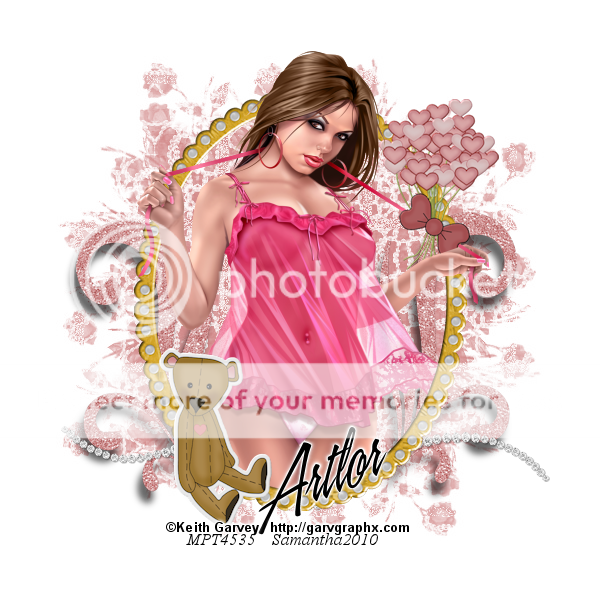
This tutorial was written on 22 March 2010 by Samantha
This is completely my imagination. Any similarities is completely
coincidental..
Create new raster layer
600x600
Open frame 3
copy and paste as new layer
resize by 30 and then again by 50%
open paper 17 copy and paste as new layer
Move below your frame layer
Go to layer load/save mask
I am using Mask226 by Weescotslass Creations,
merge group
Open Your tube of choice.
Copy and paste as new layer
Move below your frame layer
carefully erasing the legs that are below
the frame
Now duplicate your frame
Move above your tube layer
erase the parts of the frame
that is covering her hands and head.
open bear 2
copy and paste as new layer
resize down by 20% and again by 50 %
Place bottom left of the frame
open your diamond bling
copy and paste as new layer
resize down by 20%
move above your mask layer
just below the bottom of your frame layer
open your heart bouquet
Copy ans paste as new layer
resize down by 20% and then again by 60
move to the top right
See mine for placement
open sparkle3 copy and paste as new layer
resize down by 20%
Move below your diamond bling
duplicate and mirror
Merge Sparkle layers
add a slight drop shadow
Add your name and copyright
save and your done..
This is completely my imagination. Any similarities is completely
coincidental..
Create new raster layer
600x600
Open frame 3
copy and paste as new layer
resize by 30 and then again by 50%
open paper 17 copy and paste as new layer
Move below your frame layer
Go to layer load/save mask
I am using Mask226 by Weescotslass Creations,
merge group
Open Your tube of choice.
Copy and paste as new layer
Move below your frame layer
carefully erasing the legs that are below
the frame
Now duplicate your frame
Move above your tube layer
erase the parts of the frame
that is covering her hands and head.
open bear 2
copy and paste as new layer
resize down by 20% and again by 50 %
Place bottom left of the frame
open your diamond bling
copy and paste as new layer
resize down by 20%
move above your mask layer
just below the bottom of your frame layer
open your heart bouquet
Copy ans paste as new layer
resize down by 20% and then again by 60
move to the top right
See mine for placement
open sparkle3 copy and paste as new layer
resize down by 20%
Move below your diamond bling
duplicate and mirror
Merge Sparkle layers
add a slight drop shadow
Add your name and copyright
save and your done..
Subscribe to:
Posts (Atom)
My Blinkie ☆
