About Me ☆

Hello, I am Sami, the Girl behind Guilty Pleasures. I have been
writing tutorials since May 22, 2009. My first tutorial was called Twilight Obsession. How I got my name is simple. I found tagging to be my Guilty Pleasure. I thought it fit perfectly. I am a designer as well. You can find links to my blogs on my top menu. If you have questions please feel free to ask. Other wise you can read more about me on my
ABOUT ME PAGE!
My Blogs☆

Store Manager ☆

CT Manager☆









Favorite Blogs ☆







My Hangouts☆


Thursday, September 10, 2009
I Got an Award

make sure to follow the award guidelines:
1.display the award on ur blog
2.Link to the blog u recieved it from
3.Nominate 10 other blogs
4.Leave a message for them on their blog
these r the blog I awarded:
Wednesday, September 9, 2009
Beach Fun
Scrap Kit Beach fun by ZiggyFan
Mask 85 by Weescotslass Creations
Tube of Choice I am using Pinup Toon, please do not use unless you have a proper license to do so. you can purchase his work and a license @ CILM

This tutorial was written by me on 9 September 2009. Any similarities to this is completely coincidental.
Open new raster layer 600x600n
Open tube of choice
copy and paste as new layer
open paper of choice I am using paper 6
Copy and paste as new layer
Go to layers, load and save mask
Merge mask group
Move below your tube
Open both of your surf boards.
Grab one copy and paste as new layer
Move below your tube layer
Free rotate right by 15
copy and paste your second surf board
Move below your tube
Free rotate right by 15
mirror image
Open your sand castle
Copy and paste as new layer
resize to your liking and move below your tube layer
bottom left for placement
Open your sand pale
copy and paste as new layer
resize to your liking
Move to the bottom right
Open your umbrella
Mirror image
resize to your liking and move behind your pail
Open your life ring
copy and paste as new layer
Resize by 50%
Free rotate by 50
Move below both surfboards and behind your tube
add your copy right, name and save
you are complete.
Dont forget to send me your results to scrapsbysamantha@gmail.com
Mask 85 by Weescotslass Creations
Tube of Choice I am using Pinup Toon, please do not use unless you have a proper license to do so. you can purchase his work and a license @ CILM

This tutorial was written by me on 9 September 2009. Any similarities to this is completely coincidental.
Open new raster layer 600x600n
Open tube of choice
copy and paste as new layer
open paper of choice I am using paper 6
Copy and paste as new layer
Go to layers, load and save mask
Merge mask group
Move below your tube
Open both of your surf boards.
Grab one copy and paste as new layer
Move below your tube layer
Free rotate right by 15
copy and paste your second surf board
Move below your tube
Free rotate right by 15
mirror image
Open your sand castle
Copy and paste as new layer
resize to your liking and move below your tube layer
bottom left for placement
Open your sand pale
copy and paste as new layer
resize to your liking
Move to the bottom right
Open your umbrella
Mirror image
resize to your liking and move behind your pail
Open your life ring
copy and paste as new layer
Resize by 50%
Free rotate by 50
Move below both surfboards and behind your tube
add your copy right, name and save
you are complete.
Dont forget to send me your results to scrapsbysamantha@gmail.com
Saturday, September 5, 2009
Happy Halloween
Scrap Kit Halloween by Sarah. You can puchase @ Pimp My tags with Scraps
Tube by Keith Karvery, You can purchase his work @ MPT. Do not use unless you have a proper license to do so.
Maske 362 by Vix, you can download here
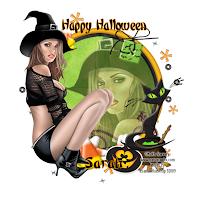
Lets get started. This tutorial was written by me on 2September 2009. All similarities to this is completely coincidental..
You will need pspx2 or any earlier version
Create new raster layer 600x600 Flood fill white,
Open your frame of choice. I am using Frame2
Copy and paste as new layer
Grab your magic wand and click inside the frame
Make sure you get all the little circles too
Then go to selections, modify and expand by 6
open your tube of choice. Copy and paste as new layer
I am using the close up layer for this tube.
Go to selections, invert and delete
Now go to your regular tube layer
copy and paste as a new layer
Go to image and mirror, move to the left of the frame
Open a paper of choice. I am using pp7
Copy and paste as new layer
Move below your frame layer
Highlighting your frame layer
Grab your magic wand and click inside the frame
Make sure you get all the little circles too
Then go to selections, modify and expand by 6
highlight your paper layer, go to selections
invert and hit delete.
Now open your spilled beads 1 element
copy and paste new layer
Move below your paper layer resizing by 80%
Open your couldron, copy and paste as new layer
Move above your tube layer and resize by 50%
Move to the bottom right of your frame
open up the cat of choice. I am using cat1
Copy and paste as new layer
resize by 50% and move to where it is sitting on the couldron
Open up the pumpkin sticker of choice
I am using sticker3. Copy and paste as new layer
Resizing by 50%, pace near the bottom of your couldron
Open up your candy corn copy and paste as new layer
resizing by 50% Move to the bottom, place under your tube layer
duplicate and free rotate right by 35%
Duplicate again and free rotate left by 50%
Merge down and duplicate move the duplicated layer
over behind your couldron
Duplicate again, move up to the top of the frame
resize by 70%, move below the hat of your tube
open up a button of choice.
I am using button2, copy and paste as new layer
Resize by 50% move to the top of your frame layer
see mine for placement
Add words of choice
I added Happy Halloween
and used a gradient glow with this color f7a009
Add your copyright, name and save
You are complete..
Tube by Keith Karvery, You can purchase his work @ MPT. Do not use unless you have a proper license to do so.
Maske 362 by Vix, you can download here

Lets get started. This tutorial was written by me on 2September 2009. All similarities to this is completely coincidental..
You will need pspx2 or any earlier version
Create new raster layer 600x600 Flood fill white,
Open your frame of choice. I am using Frame2
Copy and paste as new layer
Grab your magic wand and click inside the frame
Make sure you get all the little circles too
Then go to selections, modify and expand by 6
open your tube of choice. Copy and paste as new layer
I am using the close up layer for this tube.
Go to selections, invert and delete
Now go to your regular tube layer
copy and paste as a new layer
Go to image and mirror, move to the left of the frame
Open a paper of choice. I am using pp7
Copy and paste as new layer
Move below your frame layer
Highlighting your frame layer
Grab your magic wand and click inside the frame
Make sure you get all the little circles too
Then go to selections, modify and expand by 6
highlight your paper layer, go to selections
invert and hit delete.
Now open your spilled beads 1 element
copy and paste new layer
Move below your paper layer resizing by 80%
Open your couldron, copy and paste as new layer
Move above your tube layer and resize by 50%
Move to the bottom right of your frame
open up the cat of choice. I am using cat1
Copy and paste as new layer
resize by 50% and move to where it is sitting on the couldron
Open up the pumpkin sticker of choice
I am using sticker3. Copy and paste as new layer
Resizing by 50%, pace near the bottom of your couldron
Open up your candy corn copy and paste as new layer
resizing by 50% Move to the bottom, place under your tube layer
duplicate and free rotate right by 35%
Duplicate again and free rotate left by 50%
Merge down and duplicate move the duplicated layer
over behind your couldron
Duplicate again, move up to the top of the frame
resize by 70%, move below the hat of your tube
open up a button of choice.
I am using button2, copy and paste as new layer
Resize by 50% move to the top of your frame layer
see mine for placement
Add words of choice
I added Happy Halloween
and used a gradient glow with this color f7a009
Add your copyright, name and save
You are complete..
Subscribe to:
Posts (Atom)
My Blinkie ☆
