About Me ☆

Hello, I am Sami, the Girl behind Guilty Pleasures. I have been
writing tutorials since May 22, 2009. My first tutorial was called Twilight Obsession. How I got my name is simple. I found tagging to be my Guilty Pleasure. I thought it fit perfectly. I am a designer as well. You can find links to my blogs on my top menu. If you have questions please feel free to ask. Other wise you can read more about me on my
ABOUT ME PAGE!
My Blogs☆

Store Manager ☆

CT Manager☆









Favorite Blogs ☆







My Hangouts☆


Showing posts with label Misticheskaya. Show all posts
Showing posts with label Misticheskaya. Show all posts
Monday, October 29, 2012
Emo Love

PTU Scrapkit is Mad Emo Love - Denise Creations you can purchase at Low budget Scrapping
Artwork of Misticheskaya - Pics for Design
New Transparent Raster Layer 800x800, you can resize this later if needed.
Open frame 52 copy and paste as new layer
free rotate to the left by 28% , place in the center
Open paper 12 copy and paste as new layer
move below the frame layer and erase all parts on the outside of the frame
Open the tube copy and paste as new layer
Place below the frame and erase all parts
Add a luminance legacy to the tube
Open the tube again
Resize down by 80% about 2 times
Mirror and move to the right
Duplicate the frame layer
and move above the tube layer
erase all parts of the leg on the outside of the frame
Now carefully erase the parts of the frame covering the tube
Open element 34 copy and paste as new layer
place in the center below all other layers
open element 35 copy and paste as new layer
resize down by 80% about 1 time
Move below the Origional frame layer and erase
all parts on the outside of the frame
open element 47 copy and paste as new layer
resize down by 80% about 3 times
Mirror and move to the left
open element 43 copy and paste as new layer
resize down by 80% about 4 times
Move below the bear and to the left
Open element 12 copy and paste as new layer
resize down by 80% about 2 times
Move to the right of the bear
Open element 4 copy and paste as new layer
resize down by 80% about 3 times Move to the center
below the bear and shoe
open element 24 copy and paste as new layer
resize down by 80% about 3 times
Move to the right below the shoe
open element 22 copy and paste as new layer
resize down 1 time by 80% and move to the lieft below the bear.
Add name copyright and save
Artwork of Misticheskaya - Pics for Design
New Transparent Raster Layer 800x800, you can resize this later if needed.
Open frame 52 copy and paste as new layer
free rotate to the left by 28% , place in the center
Open paper 12 copy and paste as new layer
move below the frame layer and erase all parts on the outside of the frame
Open the tube copy and paste as new layer
Place below the frame and erase all parts
Add a luminance legacy to the tube
Open the tube again
Resize down by 80% about 2 times
Mirror and move to the right
Duplicate the frame layer
and move above the tube layer
erase all parts of the leg on the outside of the frame
Now carefully erase the parts of the frame covering the tube
Open element 34 copy and paste as new layer
place in the center below all other layers
open element 35 copy and paste as new layer
resize down by 80% about 1 time
Move below the Origional frame layer and erase
all parts on the outside of the frame
open element 47 copy and paste as new layer
resize down by 80% about 3 times
Mirror and move to the left
open element 43 copy and paste as new layer
resize down by 80% about 4 times
Move below the bear and to the left
Open element 12 copy and paste as new layer
resize down by 80% about 2 times
Move to the right of the bear
Open element 4 copy and paste as new layer
resize down by 80% about 3 times Move to the center
below the bear and shoe
open element 24 copy and paste as new layer
resize down by 80% about 3 times
Move to the right below the shoe
open element 22 copy and paste as new layer
resize down 1 time by 80% and move to the lieft below the bear.
Add name copyright and save

Tuesday, November 8, 2011
Diva by Day - PTU

This Tutorial was written on Tuesday 8 November 2011 by Guilty Pleasures aka Sami
Using my own imagination and creativity. Any similarities is completely coincidental.
Supplies Needed
PTU KIT Devilina by Amy Marie.
You can purchase this at Scrappin' Naturally .
Tube is by Misticheskaya, You must have a license to use her work
You can grab both from Pics For Design
PSPX3 or any version
Create New Raster Layer 700x700
open frame 1 copy and paste as new layer
Resize down by 80%
Open paper 4 copy and paste as new layer
Resize down by 80%
Move below frame layer
Open your tube
Copy & paste as new layer
Position to where her face is in the frame
Move above paper layer
Grab your magic wand highlight frame layer
click inside go to selections Modify and expand by 3
Selections invert, highlight tube layer and Delete
add a luminance legacy
Open your tube layer again copy and paste as new layer
Resize to your liking and position as desired.
open star spiral 3 copy and paste as new layer
Move below all other layer Repeat with Star Spiral 2
Mirror Star Spiral 2 and move to the right
Open string of pearls copy and paste as new layer move to the left
Open Your pink lipstick resize down to liking Move to the left
do the same with your pink nail polish
open your mask copy and paste as new layer
resize to your liking and free rotate to the left by 45
Move under the string of pearls to where it looks like the staple is holding it
open purse 2 copy and paste as new layer
Resize to your liking free rotate to the left by 45
place to your liking
Add your name copyright save and your done..
Resize down by 80%
Open paper 4 copy and paste as new layer
Resize down by 80%
Move below frame layer
Open your tube
Copy & paste as new layer
Position to where her face is in the frame
Move above paper layer
Grab your magic wand highlight frame layer
click inside go to selections Modify and expand by 3
Selections invert, highlight tube layer and Delete
add a luminance legacy
Open your tube layer again copy and paste as new layer
Resize to your liking and position as desired.
open star spiral 3 copy and paste as new layer
Move below all other layer Repeat with Star Spiral 2
Mirror Star Spiral 2 and move to the right
Open string of pearls copy and paste as new layer move to the left
Open Your pink lipstick resize down to liking Move to the left
do the same with your pink nail polish
open your mask copy and paste as new layer
resize to your liking and free rotate to the left by 45
Move under the string of pearls to where it looks like the staple is holding it
open purse 2 copy and paste as new layer
Resize to your liking free rotate to the left by 45
place to your liking
Add your name copyright save and your done..

Thursday, November 3, 2011
Emo Forum Set - PTU
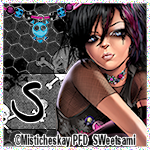
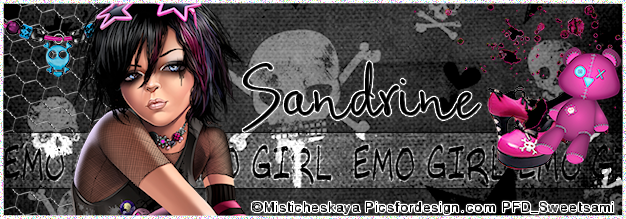
Scrap kit Emo Girl by Rebellious Scraps.
It is a PTU Kit you can purchase at The Creativity Box
Tube is by Misticheskaya, You can purchase at Pics For Design
********************************
This Tutorial was written on Friday 1November 2011 by Sami aka Guilty Pleasures
using my own creativity and imagination. Any similarities is completely coincidental.
For your Avi (Create new raster layer 150x150 )
For Signature ( New Raster Layer 650x250)
Open paper 5 copy and paste as new layer
Resize paper down to your liking, Create new layer
Go to selection, select all,
Go to selections, Modify and selection to border by 3 inside
Flood Fill white
Go to adjust and add Noise ( Random by 50%)
Open your Wire copy and paste as new layer
Resize down to your liking and move above your paper layer
Open your Tube, copy and paste as new layer
Resize down to your liking and place to the left above the wire.
Create new raster layer and Grab your selections tube and create a rectangle
Flood Fill White and add an overlay
Go to effects and add a gradient Glow, Change the color to black and hit ok
Open bracelet 2 and resize to your liking
Copy and paste as new layer
Move to the top
Open your emo bear and resize down to liking
Copy and paste as new layer place to the right to where it is sitting on the Black Gradient Glow
Open your splatter resize to your liking and move to the top right below the Bear
Open your shoes copy and paste as new layer, resize to your liking and move below your bear
Add your name copyright and save.
Subscribe to:
Posts (Atom)
My Blinkie ☆
