About Me ☆

Hello, I am Sami, the Girl behind Guilty Pleasures. I have been
writing tutorials since May 22, 2009. My first tutorial was called Twilight Obsession. How I got my name is simple. I found tagging to be my Guilty Pleasure. I thought it fit perfectly. I am a designer as well. You can find links to my blogs on my top menu. If you have questions please feel free to ask. Other wise you can read more about me on my
ABOUT ME PAGE!
My Blogs☆

Store Manager ☆

CT Manager☆









Favorite Blogs ☆







My Hangouts☆


Thursday, April 8, 2010
Vindictive Pleasure
So this one I was playing around with and It come out..
I love how it turned out.. Unfortunately I have no tut for it yet.
But hopefully soon..

Scrap kit is PTU from Gothic Inspirations
You can purchase it in her Store
Vindictive 1
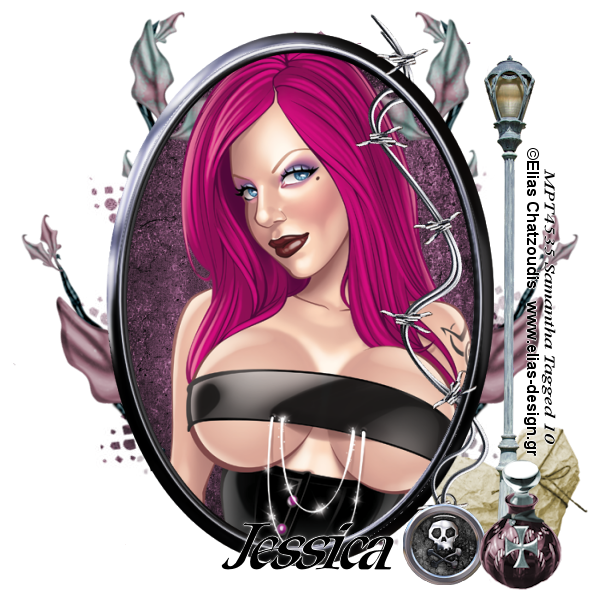
This is Tutorial 1 with a New PTU kit by Gothic Inspirartions
You can purchase this beautiful kit at her New Store
Tube is the beautiful art work of Elias Chatzoudis.
You can purchase his work here
Create New raster layer 600x600
Open frame 2
copy and paste as new layer
open your tube
grab the close up layer copy and paste
Move below your frame layer
Grab your eraser and carefully erase
the part of the tube that is below the frame
Open paper 13
copy and paste as new layer
move below your tube layer
Go to layers Load mask from disk
Choose your mask and merge group.
I am using Vix_mask148 you can download from http://www.freewebs.com/vixpsp/masks.htm
Open your parchment
copy and paste as new layer
Move above the mask layer
Grab your eraser and carefully erase the
part that is on the outside of the frame
Open your leaves
Copy and paste as new layer
Free rotate right by 40%
Plce below your tube layer
Grab your eraser and erase the part of the
leave that is inside the frame
See mine for ideas.
Mirror and dupliate the leaves and erase those as well
Open your lamp post copy and paste as new layer
resize down by 70% and move to the right
above all layers
Open your potion bottle
copy and paste as new layer
resize to your liking and place to the right
at the base of your lamppost.
open your heart
copy and paste as new layer
Resize to your liking and move below the lamppost
add your name and copyright and save
Open frame 2
copy and paste as new layer
open your tube
grab the close up layer copy and paste
Move below your frame layer
Grab your eraser and carefully erase
the part of the tube that is below the frame
Open paper 13
copy and paste as new layer
move below your tube layer
Go to layers Load mask from disk
Choose your mask and merge group.
I am using Vix_mask148 you can download from http://www.freewebs.com/vixpsp/masks.htm
Open your parchment
copy and paste as new layer
Move above the mask layer
Grab your eraser and carefully erase the
part that is on the outside of the frame
Open your leaves
Copy and paste as new layer
Free rotate right by 40%
Plce below your tube layer
Grab your eraser and erase the part of the
leave that is inside the frame
See mine for ideas.
Mirror and dupliate the leaves and erase those as well
Open your lamp post copy and paste as new layer
resize down by 70% and move to the right
above all layers
Open your potion bottle
copy and paste as new layer
resize to your liking and place to the right
at the base of your lamppost.
open your heart
copy and paste as new layer
Resize to your liking and move below the lamppost
add your name and copyright and save
Thursday, April 1, 2010
Miss Understood

SUPPLIES NEED
MISS UNDERSTOOD PTU KIT BY Grunge & Glitter
Tube by Keith Garvey
Mask 221 by Weescotslass Creations
This tutorial was written on April 1, 2010 by Samantha
All similarities to this is complete coincidental.
Create new raster layer 700x700
We can resize it later if you choose.
Open frame 5 copy and paste as new layer
Place in the center of your layer
Open your tube
copy and paste close up layer
Move below your frame layer
grab your eraser and hightlight the tube layer
carefully erase the parts of the tube that
are sticking out of the frame.
Open paper 17
copy and paste as new layer
move below your tube layer
go to Layers
Load/save mask
open mask of choice
once you get that done
Merge mask group
Now hightlight your tube layer
add a luminace legacy to it.
open your barbed wire
copy and paste as new layer
Free rotate left by 90
Move above all other layers
Resize by 65%
Place on the left side of your frame
Dupplicate and mirror
adjust if you need to
open heart 5
copy and paste as new layer
free rotate left by 22%
Resize by 40%
Move to the bottom left of the frame
open the key
copy and paste as new layer
resize by 405
Free rotate left by 22
move below your heart layer
open skull1
copy and paste as new layer
resize by 40%
Add a gradient glow and resize again by 70%
Move to the bottom right
Open your tube again.
Grab your full body tube
copy and paste as new layer
Mirror and place to the right..
Grab your text tool.
TYPE out MISS UNDERSTOOD
In a font of Choice convert to raster layer
Add a gradient glow.
Duplicate Move below your orgional text layer
Add a constellation to it.
Setting of choice
Add your copyright and name
Save and done
We can resize it later if you choose.
Open frame 5 copy and paste as new layer
Place in the center of your layer
Open your tube
copy and paste close up layer
Move below your frame layer
grab your eraser and hightlight the tube layer
carefully erase the parts of the tube that
are sticking out of the frame.
Open paper 17
copy and paste as new layer
move below your tube layer
go to Layers
Load/save mask
open mask of choice
once you get that done
Merge mask group
Now hightlight your tube layer
add a luminace legacy to it.
open your barbed wire
copy and paste as new layer
Free rotate left by 90
Move above all other layers
Resize by 65%
Place on the left side of your frame
Dupplicate and mirror
adjust if you need to
open heart 5
copy and paste as new layer
free rotate left by 22%
Resize by 40%
Move to the bottom left of the frame
open the key
copy and paste as new layer
resize by 405
Free rotate left by 22
move below your heart layer
open skull1
copy and paste as new layer
resize by 40%
Add a gradient glow and resize again by 70%
Move to the bottom right
Open your tube again.
Grab your full body tube
copy and paste as new layer
Mirror and place to the right..
Grab your text tool.
TYPE out MISS UNDERSTOOD
In a font of Choice convert to raster layer
Add a gradient glow.
Duplicate Move below your orgional text layer
Add a constellation to it.
Setting of choice
Add your copyright and name
Save and done
Subscribe to:
Posts (Atom)
My Blinkie ☆
